Simulink Model – Face-to-Face Co-Simulation With AVL CRUISE™ M
Published on February 17, 2026 · 2 min read
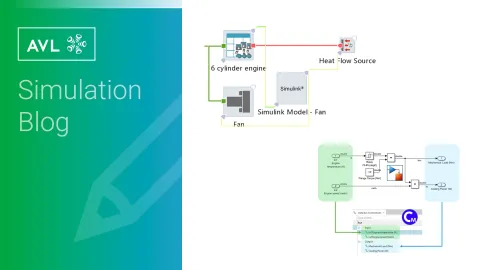
AVL CRUISE™ M Models in Simulink
The oldest still available CRUISE M-to-Simulink interface is our MATLAB S-function based export - where CRUISE M models are exported as FMUs and wrapped in an S-function interface in order to facilitate execution of CRUISE M models directly in Simulink.
Years down the line, Simulink added support for direct integration of FMUs - which should have made our S-function interface obsolete, but it still managed to fill a niche that the direct FMU import block could not.
That niche is support for specific (non-scalar) parameters like characteristics and maps with FMI 2.0 FMUs, whose definitions rely on custom annotations that follow, but are not defined by the FMI 2.0 standard.
Simulink Models in AVL CRUISE™ M
Aside from exporting Simulink models as FMUs, there was not much available in the way of directly integrating Simulink models in CRUISE M. Until now, that is.
How do I use the new component?
The Simulink Model component user interface is as simple as it gets (with a few useful extensions coming in Release 2026 R2, more on that at the end):
- A file reference editor to pick an .slx model
- A "Configure MATLAB" shortcut button leading you to the Preferences page - to let CRUISE M know where MATLAB is installed (done once and saved for future use)
- A few check-boxes, to pick whether you want a silent coupling without opening MATLAB desktop or the model - or a more interactive session, where you can quickly edit your Simulink Model between CRUISE M simulation runs.
Once MATLAB is configured and a Simulink Model is loaded, we read model files in order to reconstruct external interfaces. Top level "Inport" and "Outport" blocks in the Simulink model are mapped to input and output data bus channels in CRUISE M, respectively.
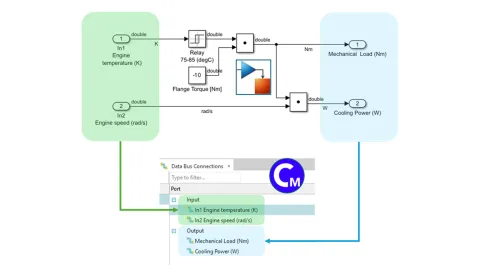
CRUISE M is in control of the simulation, and executes the referenced Simulink model according to Solver settings in CRUISE M with respect to step size.
CRUISE M makes use of the MATLAB C API interface in order to start a session of MATLAB.
To execute a Simulink model, CRUISE M makes use of the Model name as Programmatic Interface functionality. This allows us to update inputs, finely control each step, record states and retrieve outputs from the Simulink model without requiring the Simulink engine as the primary driver of the simulation.
For a ready-made example, have a look at our installation model C07023_Simulink_Model where we use a simple Fan model made in Simulink, integrate it via our data bus network and couple it with components in the thermal and mechanical domains
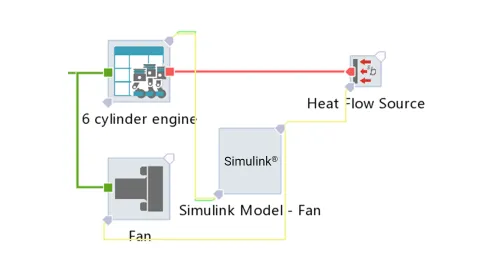
Take a look at our short workflow demonstration video below:
Caveats
Unit systems - the unit systems of CRUISE M and Simulink are not 100% compatible in format or in scope. At the moment, CRUISE M does not resolve Simulink unit references and constructs all data bus ports as unitless.
Extensions?
We are actively working on different customization options, all coming with CRUISE M Release 2026 R2:
- Decoupling time steps: Opt-in to execute the Simulink model at the step size defined in the model, not necessarily at the same rate as CRUISE M.
- Define the working directory of the MATLAB session coupled with CRUISE M: For each Simulink model referenced in a CRUISE M model, in case there are more.
- Specify startup and initialization scripts via m-file references.
Stay tuned
Don't miss the Simulation blog series. Sign up today and stay informed!
Read More About This Topic
We are proud to present our latest software release 2025 R2.
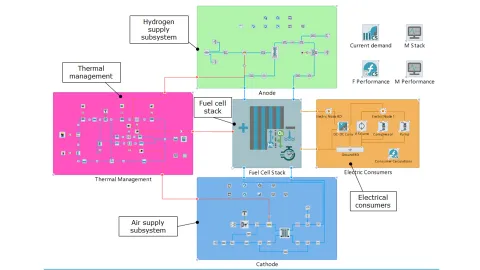
Model-based simulation enables faster, more reliable PEM fuel cell development by revealing critical system interactions early and reducing costly late-stage design changes.

How simulation reveals the physics of mobile hydrogen refueling and helps optimize efficiency, safety, and speed.
Stay tuned for the Simulation Blog
Don't miss the Simulation blog series. Sign up today and stay informed!